
Adobe joins the ranks of Microsoft with a truly botched release
 In my opinion and the simplest of terms ADOBE has really messed up this time. CC was a bad move and now LR6.2. How does a company let this product get to their users. No beta testing it appears. No prerelease user acceptance - what a fiasco.I am glad I never subscribed to CC and now have to downgrade/roll back LR6.2. Time to rethink my workflow. May be go 100% to Capture One Pro.The library module in 6.2 is really - cartoonish and so many decent features have just been eliminated. I shudder to think what I might unearth with the Develop and other modules.Microsoft botched up Windows 8 and now they are in good company with Adobe and LR 6.2.In my opinion Adobe should make the CC subscription $0.00 till they can make the product worth paying for again.Adobe profits dropped as per their earning report this week. CC was not such a good idea and now this ................ I wonder what the next quarter will look like.
Review of the Hähnel Captur Module Pro, Captur Module - IR and the Captur Receiver
Hähnel Captur Module Pro remote trigger with sound, light, laser and IR triggering. Hähnel of Ireland has replaced the wonderful Giga T pro with Captur Module Pro. Capture is high-speed trigger system that will provide remote triggering, intervalometer functions, delay triggering, long exposure and will will also work as an ordinary flash trigger.Some of the more interesting features are sound, light, laser and infrared sensors for high-speed or wildlife photography. What is even better is that the system has an auxiliary port. This allows you to use any third part triggering devices to be connected to the Captur Module Pro that in turn will trigger your camera.The basic kit comes as a set of two devices. A hand held control unit and a IR transmitter. You will need an optional wireless unit to control your camera wirelessly. The controller is a 2.4GHz transmitter with a range of 320 feet. It will work with either shoe-mount flashes or studio lights as there is a hot-shoe and a sync port. There are models for Nikon, Canon, Sony and Olympus/Panasonic. Best of all the modules all use AA batteries.Features:
- Captures Time Lapse Photography, High Speed Photography, Motion & Wildlife Photography
- Four built-in sensors (light, sound, Laser & IR). The package indicates five built-in sensors however there are four sensors (three windows) and an auxiliary port that can accommodate an infinite variety of sensors and triggers.
- Auxiliary port allows to connect 3rd party sensors such as pressure plates, humidity & temperature sensors
- Fully programmable timed sequences including delay, interval timer, exposure count & exposure length setting
- Shutter release button with autofocus, single & continuous shooting & bulb mode
- Connect wirelessly to camera using the Captur Receiver (sold separately)
Construction:The Captur Module Pro and the IR Transmitter are encased in rubber shield that covers the unit with the exception of the display and control face. Each has a 1/4 20 thread that lets you mount the units on a tripod, light stand or clamp. The IR Transmitter mounts inverted to protect it from the elements. The Capture Receiver is not rubber encased. Module Pro: The face of the unit has the display window, three buttons - Lock, Trigger and Start/Stop. Blow these is the four way rocker and a center “set” button. The left side has the cameras cable release port and the auxiliary port. The top has the microphone, IR sensor and Light sensor. The right side has a micro USB port that can be used to power the device, and the on/off switch. Note the micro USB port is covered by the rubber enclosure. The underside of the unit has the 1/4 20 mount and the battery compartment also accessible by removing the upper enclosure.
 The Module IR has a high/low switch on the front face and the 1/4 20 mount. The IR bean is emitter from the top of the unit.he On/Off switch is located on the left side and the batter compartment is in the bottom also covered by the rubber enclosure.
 The Capture Receiver has a flash hot shoe on the face a test button and an indicator light that flashes green when the unit is ready and turns red when the unit is activated. The left side has the remote trigger cabe port while the right has the On/Off switch. The bottom of the unit has a combination hotshot mount and a 1/4 20 mount. Also on the bottom is the battery compartment. Note: this unit does not have a rubber enclosure.Using the units:The handheld remote controller can be connected to your camera with a remote cable or wireless is used with the wireless receiver unit. The controller will allow you to configure various shooting scenarios that require precise delays and also works as an intervalometer for time-lapse photography. Unlike the Giga T Pro, Captur Module Pro will work as a conventional flash trigger in addition to the remote triggering functionality when paired with a Captur unit.The control unit has settings for Hours, Minutes and Seconds (HH:MM:SS) and a mode delay of 00:01 through 10:00 seconds (duration in 1/100th second). A 4 way rocker for modes and a central push button for setting the parameters. Buttons for triggering, start/stop and lock. There are four configurable options:
- Delay - lets you set an interval between the time the trigger is fired and the shutter is activated.
- Long - allows you to set a long exposure duration - the camera must be set to bulb mode. It is also possible to do long exposures without programming. This is achieved by depressing the release button for 3 seconds and the bulb function will lock and you can release the button. Depress the button once more to end the bulb exposure (long exposure).
- Interval 1 - is configured to set the interval between shots and then N1 sets the number of shots to take.
- Interval 2 configures the time between interval (Interval 1) activation sand N2 configures the number of times the Interval 1 and N1 sequence is repeated.
Using the Captur Module pro is easy if you are familiar with the Gia T Pro system. There is an online manual that is reasonable week detailed for those who have not used a Giga system or are new to Remote triggers and intervalometers.Configuring for various modes:All modes have some common options: sensitivity, amount of delay before the unit will trigger the shutter, the duration of shutter open when the camera is in bulb mode and the number of allowed activations. To enable a mode all you need to do is to press the Start/Stop button to start the process. A ready LED turns green and when the mode is triggered the LED turns Red as a verification.To set the mode, use the rocker switch to get to the sensor mode you want. The modes are in the following order:Sound mode- adjust the sensitivity of the sensor as needed.Infrared (IR) mode, (you need to use the Module - IR). Set the Module - IR and the Module - Pro so they are aligned with the IR beam lens in line-of-sight with the receiver window of the Module Pro. When the IR beam is interrupted the unit will be triggered. The Module IR has High/Low setting. Use the low setting for a beam length of 4.5 feet or less and the High for lengths greater than 4.5 feet.Light Mode - here the sensor is activated when there is a change in light level - bright to dark, dark to bright. Ideal for fireworks, lightning, or indoors with any light being turned on or off.Laser - this mode requires a laser beam to be pointed at the receiver window and works the same way as the IR beam but with a much greater distance between transmitter and receiver.AUX - this mode requires you to connect any triggering device to the Captur Module Pro via a 1/8” Tip-shield plug.Pricing:The Captur Pro Module is $120, Two receiver modules are $45 each; A pair of flash triggers not reviewed are $100 and the Capture Timer Module also not reviewed is $60.Conclusion:In my opinion the Captur system is probably the most versatile triggering system I have used and as it uses AA batteries it will last through extremely long time-lapse sequences without having to worry about a premature shutdown. The construction is solid as is the performance. In all of the tests performed the unit did not miss-fire.
Eclipse and Echelman - Colors Unified
Nature's Art one with Human Art - The September Blood Moon and Echelman's Rope Sculpture across the Greenway in Boston.
Photographing the Super Moon, Lunar Eclipse & The Blood Moon
We are about to witness a rare celestial event on September 27th, when we will get an opportunity to see a "Total Lunar Eclipse" that will give a coppery red color to the moon thus earning it the designation of a "Blood Moon". Besides which, the moon will be closest to Earth earning it the distinction of, "Super Moon". Finally, because of the time of the month/year that this event occurs it has the unique distinction of being referred to as a "SUPER HARVEST BLOOD MOON". (How cool is that?)To make things even more interesting, sunset will occur at 6:33 p.m. on the 27th and moon rise will occur at 6:24 p.m. and will reach full moon status in 4 hours which coincides with the total eclipse. That means that conditions for photographing this event should be perfect. (Weather permitting)I will also provide you with the basics of creating a time lapse of the event. You will need the right equipment and patience.Key times of the evening:• Partial Eclipse begins at 9:07 PM• Full Eclipse begins at 10:11 PM• Maximum Eclipse at 10:47 PM• Full Eclipse ends at 11:23 PM• Partial Eclipse ends at 12:27 AMI have made a few revisions to my tips page on this topic to help you capture this Sunday's event.Lunar Eclipse and Blood Moon Photography
ON1 PHOTO 10 Announced
 Perfect Photo Suite is now called ON1 Photo 10. It will be available in late October, and you can order it today by clicking on the banner above. If you order ON1 Photo 10 by September 24th you will receive several bonus extras for purchasing early.The new ON1 Photo 10 will deliver seamless app integration, up to 4x faster performance, fast module switching, an integrated mobile workflow, modern user interface, require less memory, and will still include all of the essential ON1 photo editing tools photographers love. Included are major improvements to Browse and Portrait, and overall enhancements that will make your workflow smooth and efficient.Key new features/selling points:
- Browse module - Lightning fast. New Albums and Smart Albums features. Access to photos on popular cloud devices. Sync photos with your devices using the new Photo Via mobile app.
- Portrait module - Faster speed, performance, and overall quality has been greatly improved. Completely redesigned for optimum workflow efficiency. Finding multiple faces in a portrait image has never been this fast or efficient.
- Photo Via - Sync your albums, smart albums and your favorite folders of photos with your mobile devices with our new Mobile App. We will be rolling out Photo Via in two phases, the first will be this fall with ON1 Photo 10 and the second in the first quarter of 2016. Taking your desktop photos with you and syncing your mobile camera shots back to your desktop is nothing new. Having complete flexibility to use ANY mobile editing app with your favorite desktop editing app IS new.
- New Export Features - Take a single photo, or a group of photos, and create whatever size and file format you need. It does the important file conversions, color conversions and file renaming you need when printing or sharing. It will also include all the power and features of ON1 Resize (aka Genuine Fractals) for cropping and resizing.
- Presets & User Extras - All presets and user extras that customers may have on their machine from previous version will all automatically integrate and merge into the new version.
** Pre-sale Campaign Extras - All included with purchase during the pre-sale for free:
- 3 months of ON1 Photo Magazine ($10 value). Exclusive training and content in a monthly eMagazine for ON Photo 10 Users
- The Ultimate ON1 Photo 10 Training ($50 value). In-depth video courses from Matt Kloskowski. Over 10 hours of ON1 Photo 10 training.
- Family License Pack ($200 value). Install ON1 Photo 10 on up to 5 computers. Mac or Windows.
Think Tank Retrospective Leather - just released
 Think Tank Photo just announced the release of two new product line extensions as well as a new “free gift” offer.The first are the Retrospective® 5 Leather, Retrospective® 7 Leather, and Retrospective® 30 Leather. These upscale, rugged shoulder bags maintain the Retrospective’s casual, form-fitting design. A new Dual Cross buckle on the front flap provides an extra measure of security. The new shoulder bags are designed to hold tablets and laptops in dedicated zipper pockets.Click here to shop
 The new Mirrorless® Mover 25i fits one medium to large mirrorless body, plus two to four lenses, an 8” tablet, and additional accessories. It features metal hardware, high quality fabrics, YKK® zippers and a magnetic closure.Click here to shopAnd, through the end of September, whenever you buy an eligible backpack from Think Tank you will receive the Camera Support Straps V2.0 along with a Camera Strap V2.0 free! Think Tank offers a wide variety of innovative, high quality transportation and field photography backpacks. Order one and you will get to experience something really unique, which is having the weight of your camera shifted from your neck to your backpack harness system. With the Camera Support Strap V2. no more sore shoulders or neck aches!Click here for this offer
Battle of the Barges - Boston Sept 5, 2015
 After a very long time the Battle of the Barges returned to Boston. Piers Park would have been the ideal location but the crowds were overwhelming. Alternate East Boston location provided good views of the North End Barge.Please click on the image for a larger version.


Iceland August 2015 - Day 4 and a Resolution Test
Today was a travel day to the highlands with a few stops en route.Here are a few images and an experiment seeking detail.


 This image above was taken as an 8 image pano and stitched in Photoshop. The resulting image is 23,881 pixels by 7680 pixels. This equates to an image 100 by 32 inches (approx) at 240 dpi. There is a farm in the distance that I have applied a red stroke to in the image below (this has been reduced to 500 by 1600 pixels. Please do click on the image below for a larger rendition. Equipment: Zeiss Planar 50mm f/1.4 at f8, Sony A7R ISO 200, 1.6 sec using a 6 stop HiTech ND filter.
 I cut and pasted this stroked area onto a new image layer in Photo shop. The crop is about 1936 by 479 pixels. The crop section is below - please click on this for the full scale view.
 The new mirrorless sensors are amazing.
Iceland August 2015 - Day 3
 This the last full day in the peninsula (rain and wind aside) was spent exploring the far west and the northern coastline.


Iceland August 2015 - Day 2
Day 2 was not much a far as the weather but a good day for photography in the Snæfellsnes Peninsula. An area with a diverse landscape of fjords, dramatic volcanos, sheer sea cliffs, beaches and lava fields.Here are some images from day 2. Click on the image for larger rendition.


MacPhun updates Noiseless Pro
NOISELESS PRO UPDATE - get an improved Creative Kit at 73% OFF with this new app version inside!The major news is that Noiseless Pro, which provides a one-click solution for eliminating digital noise, now includes the option of BATCH PROCESSING.Key Improvements:Noiseless remains the fastest noise reduction software for Mac, with the update bringing a 14% speed increase.With Batch Processing, users can process a number of images at once, resizing, renaming and saving files in popular image formats (JPG, TIFF, PNG)You will have the option to select from automatic noise reduction, use a built-in preset, or even create their own custom preset. Custom batching presets can also be saved so a combination of options chosen previously can be used again.The Light, Moderate and Medium presets have been improved to give even better results with portraits and photos where the noise is minimal.The new Noiseless Pro will be available for $49.99 as a limited time offer, with a possibility for upgrade from standard Noiseless for $29.99.You can purchase Noiseless Pro - for $49.99 you only get one app, while $99.99 will get you the complete Creative Kit all 5 Pro apps together!If you own the standard version of Noiseless, you can get Batch Processing via an in-app purchase for only $7.99 or by upgrading to Noiseless Pro. Owners of the Pro version will receive a free, automatic update. CLICK ON THE Noiseless Pro Icon to get the product. Also check out FX Photo Studio and its stunning filters. All for just $9.99 at the app store.
 [embed]https://www.youtube.com/watch?v=_ho9OhgM2Rk&feature=youtu.be[/embed]
Iceland - August 2015 Day 1
It was unfortunate that we had very poor internet service this trip to Iceland hence no posts. This was a small group photo tour to the Snaefelsness Peninsula and the Highlands. The trip was 11 days with 10 of them rainy and very windy - this is Iceland after all. We arrived at a decent hour in Keflavik and on to the car rental. The morning was spent organizing cell phone SIM cards, drinks and snacks. We had breakfast at a quaint little breakfast pleace in Reykjavik. Walked about town and then drove on to a fishing village Hellnar and checked in to the hotel.A brief trip along the Southern coast before dinner and bed. Note that this and most if the images in subsequent posts lack great skies.

China - a 15 day Photo Tour
Shanghai-Luoping-YuanYang

February 21st - March 6th, 2016 (15 days/14 nights)
Shiv Verma Photography in partnership with Adventures in Photography, LLC is please to announce a trip of a lifetime to China. (CLICK HER FOR DETAILS)
Panasonic Lumix FZ1000
Received an evaluation unit of this bridge camera this afternoon. The camera has an incredible 24 to 400 mm (35mm equivalent) f/2.8 lens that will blow you away. BTW the lens has the Leica designation. More on this camera in a future post but this was the first image shot out my back door. A juvenile male Downy Woodpecker. Not the best lighting conditions but the camera and lens performed really well. The crop represents less than 15% of the original image before being resized for this blog. Click on the image for a larger rendition.
Unique Photo Expo
 Unique Photo is having their 3 day extravaganza the Unique Photo Expo.June 26th – June 28th, 2015In association with AIP I am presenting Travel Photography With a Mirrorless Camera on Saturday afternoon. To learn more about this program, check out the following link:https://www.uniquephoto.com/event/728The event is at the Unique Photo Superstore located at 123 US Route 46 West in Fairfield, NJ 07004Details at: https://www.uniquephoto.com/expoAs a special incentive, anyone that mentions AIP at the door will get a $10.00 token which can be applied to any purchase.AIP will have a table at the event. Stop by and say hello.
Peony

"Dusk on the FlowerOf the white peonyThat embraces the moon."Gyodai - Haiku from the Edo period (1603 - 1868)
This image was inspired by Chinese/Japanese art where paintings of peonies proliferate. In this culture, it is not only the symbol of wealth and status but can also be a metaphor for female beauty. In Western culture the flower was named after the Greek God Paeon. The root of the white peony like many other plants is used for medicinal purposes.
As a photographer the beauty of this flower captivates and inspires me.
Since there is no direct translation of my name into Chinese, I had to create my own "chop" - an an S and a V.

Bridging the Gaps
 June 12, I got to see the Greenway Project’s latest artwork a little over a month after its installation. Boston’s aerial rope sculpture created by the artist Janet Echelman is an exquisite sight at night. The ropes are over 100 miles long and the sculpture has nearly 550,000 knots. It is anchored to a few buildings and lit using multicolored led lights. A long exposure bridges the gaps between the ropes as I feel this signifies the coming together for all in this great city.
 “My sculpture for Boston above the Rose Kennedy Greenway spans the void where an elevated highway once split downtown from its waterfront. Knitting together the urban fabric, it soars 600 feet through the air above street traffic and Pedestrian Park.The sculpture's form echoes the history of its location. The three voids recall the "Tri-Mountain" which was razed in the 18th-Century to create lands from the harbor. The colored banding is a nod to the six traffic lanes that once overwhelmed the neighborhood, before the Big Dig buried them and enable the space to be reclaimed for urban pedestrian life.” An extract from the artist’s statement.
Rendezvous with the Sensuous
 "Every direction offers a lesson in form and aesthetic options; one element after another attracts the eye with texture, color and tension that provokes a spectrum of emotion."an excerpt from Rendezvous with the Sensuous: Readings on Aesthetics - Linda Ardito, John Murungi
Hummingbird Moth Hemaris thysbe
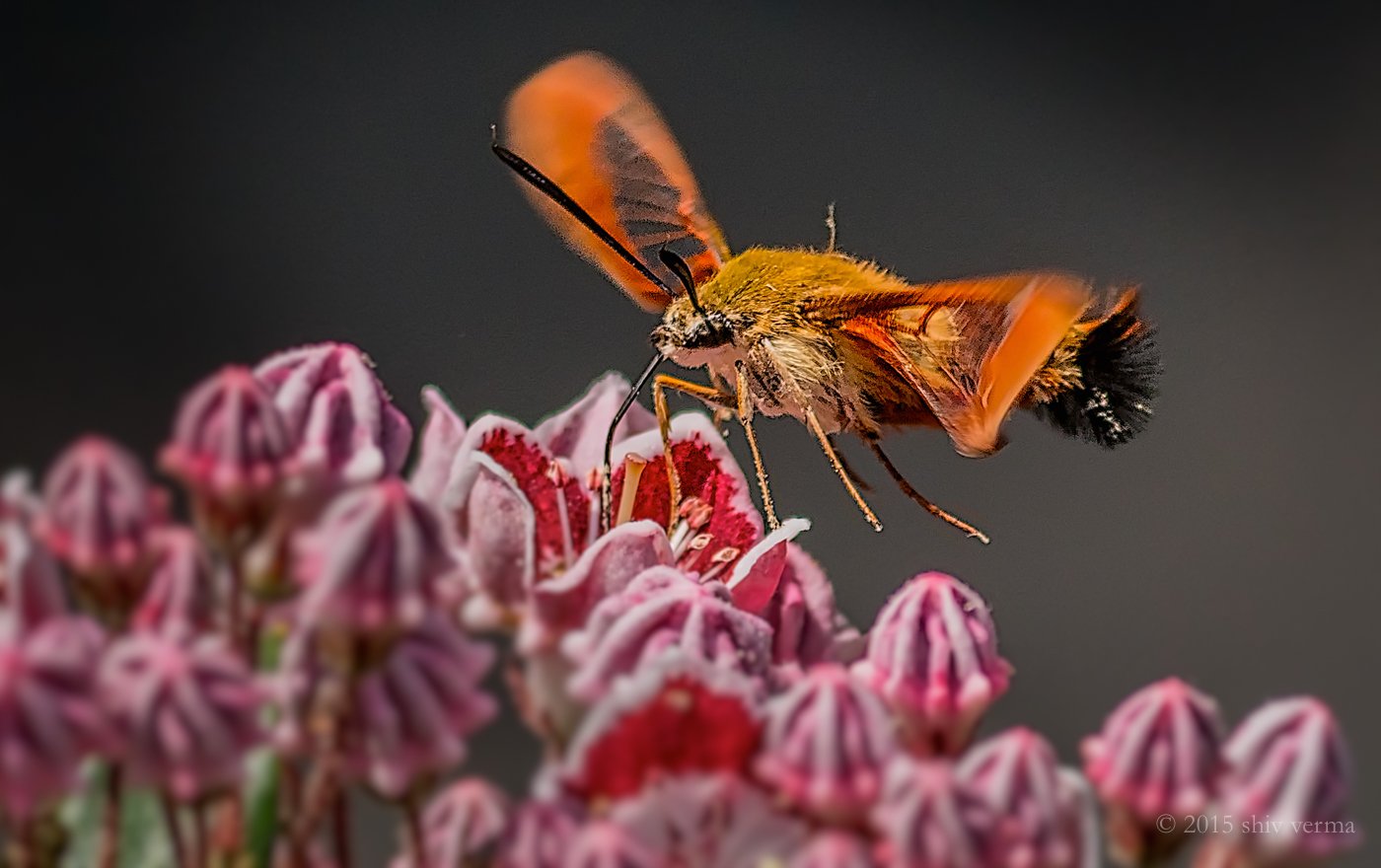 The Hummingbird Moth Hemaris thysbe, unlike most moths that are nocturnal or shade loving, is seen on bright sunny days. It is a fantastic hovering species that flies like a hummingbird and hence its name.They feed on nectar using a very long proboscis. Their wings flap at incredible speeds. This image was captured at 1/1600 sec and I was unable to freeze the wings.