
Panasonic Leica DG Summilux 15mm f/1.7 ASPH - Review
 Introduced in March 2014 the Panasonic Leica DG Summilux 15 mm f/1.7 lens is beautifully constructed. With a maximum aperture of f/1.7, Nano Surface coatings, a manual aperture ring and an on lens AF/MF switch this is an ideal all purpose lens. It is supplied with a well designed metal lens hood and a lens pouch. Current street price of $498 makes this a very affordable high quality compact lens.On a full frame equivalent basis this lens has an angle of view of a 30mm lens. It is constructed of quality metals and plastics and has a metal lens mount. It is a light lens at a hair over 4 ounces or 115 grams. The lens feels good when held and exudes Leica quality.It is a small diameter lens that works well with the smaller form factor Panasonic MFT bodies. The lens does not extend below the base of the GM series bodies and will not interfere with tripod mounts.A well designed, circular metal lens hood does a great job of preventing flare. As with any lens, the lens hood is added protection for the front element of the lens.
Specifications:
| Focal Length | 15mm - Comparable 35mm Focal Length: 30 mm |
| Aperture | f/1.7 to f/16 |
| Angle of View | 72° |
| Minimum Focus Distance | 7.87" (20 cm) |
| Elements/Groups | 9/7 |
| Diaphragm Blades | 7, Rounded |
| Filter Thread | 46 mm |
| Dimensions (DxL) | Approx. 2.26 x 1.42" (57.5 x 36 mm) |
| Weight | 4.06 oz (115 g) |
The filter thread is 46mm. As the lens has internal focusing there is no rotation of the front section. This keeps any attached filter in the orientation as is was installed. The lens has a switch that is used to switch the lens from autofocus to manual focus. This is a very convenient feature so you do not have to use any switches or buttons on the camera to lock focus or to flip between the two modes. The lens has very fast autofocusing in good light and most acceptable in low light situations. The lens has a manual focusing ring that is well damped and smooth through the focus range. One nit that I have is that the lens has no focus markings. The lens focuses close with a minimum focusing distance of 7.87 inches or 20 centimeters.Another great feature of this lens is the manual aperture ring. It has positive clicks at 1/3 stop increments and is very comfortable to operate. To switch the lens to automatic camera controlled aperture the ring has an “A” setting that is beyond the f/1.7 making. The manual aperture ring does not work on the Olympus OM-D E-M1 body. When using the manual aperture settings, the aperture blades remain stationary when the lens is set to Manual focus. However, if the lens is set to Autofocus the aperture blades do open a fraction and then close down to the set aperture. This is an important consideration for time-lapse photography where aperture blade deviations tend to cause flicker in the sequence.Performance: (This evaluation is based on using a test chart designed for use with ISO 12233 Photography as shown below) Sharpness is excellent in the central frame at f/1.7 and edge sharpness reaches the best at f/4.0. f/4 is the sweet spot for the lens tested. At f/11 there is a slight loss of sharpness due mainly to diffraction.Chromatic aberrations are minimal and not noticeable through the aperture range. High contrast edge fringing is just visible at f/1.7. There is no fringing visible through the f/2.0 through f/11 range. At f/16 there is slight fringing but that too is minimal and barely discernible until closely scrutinized.The following comments are based on real life tests.Lens flare is very well controlled and not perceptible even when the lens is wide open and shooting into bright light sources. It is preferable to leave the lens hood on as a preventive measure. That Nano Surface Coating does a good job here.Once again, testing the Chromatic aberrations of this lens I found it to be minimal and what little there is can be easily removed in post processing. High contrast edge fringing is visible at f/1.7 and was not tested at f/11 and greater. In the MFT world one would rarely use f/11 and smaller apertures unless extreme depth of field is desired at the expense of refraction.Like most fast wide-angle lenses this lens demonstrates light fall off (vignette) when wide open. The falloff basically disappears at f/2.8.Barrel distortion is not noticed through the range f/1.7 to f/8.0Sample Images for distortion and vignetting:The first set was captured with the camera in portrait orientation.


 The second set was captured with the camera in landscape orientation.


 Sample Images for edge fringing:


Pros:
- Superior build quality
- Fast autofocusing
- Excellent sharpness
- Low light falloff beyond f/2
- Barely perceptible chromatic aberration
- Manual aperture ring
- Lens body Auto/Manual focus switch
Cons:
- No focus markings
My verdict: I highly recommend this lens and now own one.
Here are some additional sample images.
This first set is a set of straight on images of a store shelving. Images captured using apertures of f/1.7 through f/5.6


 This next set is to demonstrate DOF and how well the lens deals with shallow DOF.


This last set of images is to demonstrate that the lens has minimum barrel distortion using real life examples:


Olympus OM-D E-M1 firmware Version 3.0 now available
This is from the Olympus press release earlier this month."With the introduction of new firmware Version 3.0, the weather-resistant camera is now capable of an impressive maximum 9 fps in the C-AF sequential shooting mode when using a Four Thirds® or Micro Four Thirds® lens, improving the ability to capture moving subjects. The newest firmware upgrade features an enhanced algorithm for phase-detection, raising the former C-AF sequential shooting speed of 6.5 fps to a maximum high speed of 9 fps. With this update, AF tracking performance is improved when using continuous-AF (C-AF) Sequential H mode. When set to C-AF, 37-point on-chip phase detection AF is used. Now, when capturing a quick-moving subject, photographers never need to miss the shot. A maximum 10 fps remains available when set to single-AF (S-AF) Sequential H mode.The update also adds support for the latest Version 2.5 of the Olympus Image Share Android® and iOS® app. Users can now select Movie as a shooting mode, and record movies while viewing the Live View screen on a smartphone."
When all you see is snow and the temps are 17 below.
There is no point freezing in these temperatures so here are three images begging for spring. Each was shot using a Zeiss 50mm at f/ 1.4 and a shutter speed of 1/80 to 1/100 sec, ISO 100. A high key setup with a single strobe on the background and two for the flower. Each image was compiled from a stack of 6 to 9 images for the best DOF.Image personality achieved by post processing in LR5, PS6, NiK and Macphun.


Photoshop Contender - Affinity Photo (Mac only)
 The European company Serif makers of Affinity Designer have announced the Beta release of Affinity Photo. Affinity Photo is slated as a Photoshop alternative and appears to be a very strong contender. Available only as a Mac platform software and when released will be much cheaper than Photoshop. Their Designer product sells for $60.Of significance is the claim that as it is all new code and developed for the new processors and graphics hardware, it is much faster and greater overall performance than Photoshop.CLICK HERE to go to the Serif site and to sign up for the Beta
Topaz ReStyle - February Promotion
 Effective today through the end of February 2015 get Topaz ReStyle for $20 off its original price of $59.99, that is just $39.99).Use the coupon code: febrestyleReStyle is a plugin designed to alter the colors in your image with its unique array of toning effects. The technology behind ReStyle uses a cutting-edge process to map the color and tone statistics from a source image.With this, creative possibilities extend to many inspiring choices. Restyle is a useful tool for the photographer or artist looking to alter the overall feeling and mood of his or her image. The program can even be used to revamp the tone of graphics and textures.CLICK HERE to order
TWiP Episode 398 – Raiders of the Lost Art
 In this TWiP episode Renee Robyn, Ibarionex Perello (The Candid Frame) and I join Frederick to tackle the hot question… is photography “art”, and are photographers “artists”?Your thoughts and comments will be most appreciated.CLICK HERE TO WATCH THE EPISODEThe audio only version can be subscribed to on iTunes or via an RSS feed.
Subscribe: iTunes | RSS | More Subscribe Options
Speaking of Innovation - Olympus OM-D E-M5
 Yesterday Olympus announced the OM-D E-M5 MkII - a 16 megapixel Micro Four Thirds camera. I am not going into all the specs and details about this upgrade to the current E-M5 with one exception. I am referring to “Innovation” - the E-M5 is capable of creating a 40MP image by using a sensor shift technology. Sensor shifting is achieved using the same electronics and electromechanical functions of the 5-axis image stabilizer. The technology shifts the sensor in 8 steps in a pattern where the first four frames move the sensor in such a way so as to capture all colors at each pixel position. The sensor then shifts 1/2 a pixel width up and to the left, capturing full color information in the onset position. The entire process takes about 1 second. As a result it is not feasible to capture these high resolution images of subjects that may move. I guess they will perfect this technology over time but as it is it is impressive.It is worth reading an article on the Imaging Resource web site where they have compared images from the OMD E-M5 Mk II to the Nikon D810 (a 36MP camera) and some animated examples on the DP Review web site.On a side note - Canon today announced the M3 the third generation of its mirrorless camera - for the Asian and European market. I guess it is hard to compete against the strong foothold Panasonic, Olympus, Sony and Fuji have in North America.
Canon 50MP EOS 5D S and 5D SR - my 2 Cents
 Canon announces two 50MP full frame DSLR (mirror box) cameras, the 5DS and the 5DS R. Price for the S is $3,700 and the S R $3,900. The $200 price difference give you the ability to deploy a The only difference between the models is that for $200 more you get self-cancellinglow pass filter. It is stated that the 5D Mark III will remain in production along side these new models. Availability June 2015 but you can pre-order them now. So whats new and what have Canon taken away from the great 5D MkII that is approaching its 3rd birthday on March 2, 2015?
Co mpare the 5DS and 5DS R to the 5D MkIII
- The 5DS has Gold lettering (top of the line EOS) the 5DS R on the other hand has white and red lettering more like the Rebel series vs all white on the 5D MkII
- 50.2MP CMOS sensor vs. 22.1MP
- 5fps continuous shooting vs. 6fps
- ISO 100-6400 (Extended ISO 12,800) vs. 25,600 (Extended ISO 102,400) Not a low light performer - Nikon and Sony are still on top.
- 61-point AF point with 41 Cross types and 5 double cross types (5D MkIII is the same)
- Metering 150k (RGB + IR) vs 63 segments (RG/GB)
- Digic 6 processors vs. Digic 5+
- Optical low-pass filter on the 5DS and the 5D Mk III. The 5DS R has a self canceling feature
- Motorized Mirror vs Spring loaded in the 5D Mk11I. This is refinement for Mirror lock-up to prevent mirror slap vibrations. When active it uses a single shutter release rather than the two for the 5D MkIII.
- Built in Intervalometer (Thank you) vs. none
- Video - all three have the same video capture capability. However, the new models do not have a headphone jack and no clean manuals HDMI output. None of them offer 4K. So for video the 5D MkIII is still on top. part of the reason is the USB3 port that is much longer than the old USB2 port so there was no space left. In my opinion - the 1D form factor would be the perfect body type for this introduction.
- USB 3 vs. USB 2. Fast UHS1 compatible card slots on the new cameras.
What else is missing
- No Touch Screen
- No Articulating Screen
- No focus peaking
- No Zebra Stripes
- No on-board stereo microphone
- No GPS
- No WiFi or NFC
- Innovation
So here are my thoughts on all this. Why rush to announce this 5 months before any signs of availability. Who really needs 50MP and particularly on a 35mm (full frame) sensor. 36MP sensors on the Sony A7R and the Nikon D810 are very unforgiving. Stability and accurate focusing are critical for a good image so if you want this camera, plan on getting a really solid tripod, a top quality ball head and learn how to use the combination well. These will not be a casual users camera. Studio and landscape photographers will or may benefit. The big questions I have are:What is the real low light performance - Reduced high ISO may indicate it not to be too greatWhat is the real dynamic range - will it be as good as the Sony sensors used in the Nikon D810 and the A7R.It will be great to see some test results and real life performance reports.
Think Tank February Specials
 Great news from Think Tank Photo. For the month of February, whenever you order one of their rugged, multifunction, and secure backpacks* they will give you for free your choice of one of their popular AppHouse 8 or AppHouse 10 tablet cases. Their backpacks range from the field-oriented StreetWalker backpacks to their transportation-oriented Airport backpacks, as well as their expandable Shape Shifter and their “long glass” backpacks. The AppHouse shoulder/belt-mounted tablet bags are a great way to carry a digital portfolio or presentation, transmit images, or access your music, games, apps and more. And don’t forget, as a friend, whenever you order $50 or more of any Think Tank gear using my special link you can add yet one more free item to your order, as well as free shipping! To receive your free AppHouse follow the rebate download instructions on the backpacks’ product pages. [*Note: this special offer does not apply to Perception backpacks.]CLICK HERE TO ORDER
Panasonic releases firmware version 2.1 for the Lumix GH4
Panasonic released version 2.1 on January 26, 2015. Had to wait and test it all before posting this. As with any firmware update, please follow all instruction and do so with care. Here is the excerpt from the Panasonic web site and the links to the update:
- Time code can be embedded to the HDMI output signal.
- Selectable in Motion Picture menu : [Time Code]>[HDMI Time Code Output]* Available when DMC-GH4 or DMW-YAGH are connected with the products of ATOMOS Global Pty. Ltd. or the products complying with the extended specifications of ATOMOS Global Pty. Ltd..
- RSS (Recording Start/Stop) signal can be embedded to the HDMI output signal.
- Selectable in Motion Picture menu : [HDMI Rec Output]>[HDMI Recording Control]* Available when DMC-GH4 or DMW-YAGH are connected with the products of ATOMOS Global Pty. Ltd. or the products complying with the extended specifications of ATOMOS Global Pty. Ltd..
- FHD at 30p/25p native output via HDMI is available while recording video in FHD at 30p/25p.
- Selectable in Motion Picture menu : [HDMI Rec Output]>[1080/30p Set.] or [1080/25p Set.]
- Playback performance of recorded 4K video is improved.
- [Time Lapse Shot] Program is fixed to start recording at the designated time even when [summer time] is set.
A Image Size Test with the Panasonic Lumix LX100
 To set the stage, the Lumix LX100 is a 12 MP camera that uses a 16MP sensor. As the camera can be configured for 3:2, 4:3, 1:1 and 16:9 aspect ratios, Panasonic has been successful is maintaining 12MP per frame utilizing portions of the 16MP sensor to its max. The LX100 is a small fixed lens camera and you can get the specs here.Many questions have been asked about Micro For Thirds (MFT) cameras and their ability to produce images ready for large prints. Keeping in mind that a majority of images these days are created and shown on computer screens and small portable devices. The maximum image size for the printed page for a magazine is 8.5 by 11.0 inches and for a double page spread 17.0 by 11.0 inches with a resolution of 240 to 300 DPI.So last weekend I shot a few images with the Lumix LX100 hand-held at a casual photo shoot. The lights were set for ISO 100 and f/8.0. Focal length 34 mm which is a 68mm equivalent.Here is one image cropped from the original size of 3456 by 4608 pixels to 2284 by 3416 (roughly 7.8MP or 2/3 the resolution of the effective sensor.Click on the image to see it full resolution.
 Next, I up-sized this image to 30 inches by 44 inches at 300 pixels per inch. The following image is a 5 by 7 aspect ratio crop 1165 by 1631 pixels.
 Feeling good, I resized the original crop to 60 inches by 90 inches at 240 pixels per inch. The final image is a 5 by 7 aspect ratio crop of a similar section 2148 by 3007 pixels.
 Resizing was accomplished using OnOne's Perfect Resize. No post processing, sharpening or clarity adjustments were made to the resized images. All OnOne defaults were left as is. Some degradation is apparent but as a result of jpg conversion.Hope this dispels the myth that a MFT image can't be made into a large print.
Canon Firmware Updates and Earnings
Firmware updates for Canon's 5D Mark III and 1D X have been released. These updates primarily improve autofocus in Live View and a few orher small bugs.Links to the update pages are as follows:
Download Canon 5D Mark III firmware version 1.3.3
Download Canon EOS-1D X firmware version 2.0.7
Canon also released its earnings report for Q4 2014. Click here for the report.
Of significance is the fact that Canon's imaging sales in the America's had the greatest decline of nearly 12% year over year. From to 392,373 billion Yen in 2013 to 345,707 billion Yen in 2014.
Lightroom 6 - compatibility information
As per a post on the Adobe blog yesterday, Lightroom 6 when announced will only work on 64 bit platforms. This means Mac users must be on OSX 10.8 or above and Windows users must be on Windows 7, 8 or 8.1 64 bit.More info at http://blogs.adobe.com/lightroomjournal/2015/01/update-on-os-support-for-next-version-of-lightroom.html
Manfrotto's Nanopole Stand and Snap Tilthead

Manfrotto Nanopole Stand - MS0490A
If you are looking for a lightweight, compact and portable light stand for studio or location shoots using a speed light this is your answer. The Nanopole is a lightweight and compact stand for flash heads and and modifiers weighing under 3.5 pounds It will extend to 6' and has with a removable riser section that can be used as a boom-arm for hand held or clamped positioning. The stand has reverse folding legs allowing it to fold down 19.3" for packing.The Nanopole possesses a couple of features which make it stand out from many other light stands. It has a convenient hook to secure sandbags for additional stability. One leg is extendable to permit leveling on uneven surfaces. Note however, it will not level on stairs. The riser is easily detached from the legs by a simple push on a release button on the bottom of the pole. The Nanopole is ideally suited for indoor and outdoor photography and has some visual appeal too. The red anodized accents and logo give this stand a bit of pizzaz. The Nanopole sells for under $80.


Manfrotto Snap Tilthead with Shoe Mount - MLH1HS
 The Snap Tilthead with Shoe Mount from Manfrotto is new and unique yet very handy way to mount your flash off-camera. You can use the flash with an umbrella or a small softbox.Unlike most swivel adaptors the Tilthead does not have any large extended levers and locking handles and is easy to pack and store. The Tilted fits all nightstands with 5/8” stud and has a unique spring loaded locking lever. The Tilthead has an auto-locking knob for angle selection with a built in spring loaded counterbalance mechanism. This prevents the the flash from tipping into the stand. The shoe mount loosens and tightens via collar that requires a single twist. The Tilthead will accept all standard hot shoe flash heads.The Tilted sells for under $40.
 The two devices together make an excellent portable solution.
Iceland - February 28 to March 7
 With the exceptional Aurora Borealis activity in Iceland, I am doing a 1 week photo tour and workshop that will be exceptional.From the western peninsulas of Snæfellsnes and Reykjanes to the exceptional south coast including the exquisite black sand beaches and icebergs in Jökulsárlón and surrounding areas this trip is designed for all levels of photographers. This trip is limited to a maximum 7 participants.All Iceland photo tours and workshops in 2014 and 2013 were fully subscribed within days so please register as soon as possible.CLICK HERE FOR DETAILS
Photography at CES 2015
CES 2015 officially opened today January 6, 2015 but most of the key product announcements were made yesterday. Here is a quick roundup of photography related products. Some WOW and Some (I don't know what to say). My big question once again is - What's up with Canon and Nikon.Sadly Canon announced not much. A camcorder update to three of its consumer targeted models. A round of PowerShots, 2 ultra compact cameras and 3 mega-zooms - Oh well so much for Canon and innovation. One more, a Connect Station that is 1TB media gizmo for offloading content from cameras. “Canon Connect Station CS100, a photo and video storage device that has the capability to connect to multiple compatible imaging devices allowing users to easily store, view and share images and videos” from the Adorama web site. Was this gizmo so important? Particularly since there are not many Canon Cameras that can take advantage of the NFC feature.Nikon too, lackluster, announced a D5500 3.2 inch touch screen and not much more with this model as the update to the D5300 - coming into the real world finally. In addition Nikon introduced a light 300mm f/4 lens the AF-S Nikkor 300mm f4D IF-ED. This is an image stabilized lens and uses technology that is similar to Canon’s DO (diffractive optic-element) lenses. Nikon also announced a slow collapsible 55-200mm f4-5.6 consumer lens.Fuji film announced their 16-55mm f/2.8 lens as per their lens introduction schedule. The lens is optimized for the XT-1 and is weather sealed. Unfortunately it is not image stabilized.Panasonic introduces the Lumix ZS50 with 30X zoom and follows Sony with downsizing megapixels from 18 to 12 for better low light performance. Also introducing a few camcorders and a few full featured 4K/UHD versions. Anther great introduction but shown in Beta is a 4K capable Blu-Ray player. Best of all the Panasonic Lumix CM-1 Smart Camera (A Camera Phone or a Phone Camera) introduced last year at Photokina will be released in the US this summer - more here.Sony blasted its own flurry of 4K video products. A prosumer 4K/UHD handy cam the FDR-AX33 that breaks the $1000 barrier. A new Action Cam the FDR-X1000V with 4K video and enhanced image stabilization.Though not a camera or camcorder but photography related, Wacom announced a few new models of its Windows 8 tablet/secondary desktop display along with a couple of larger desktop Cintiq displays.My picks for whatever it may be worth are the Panasonic CM-1 and the Wacom Cintiqs.
Fog Photography - a new article in "Tips"
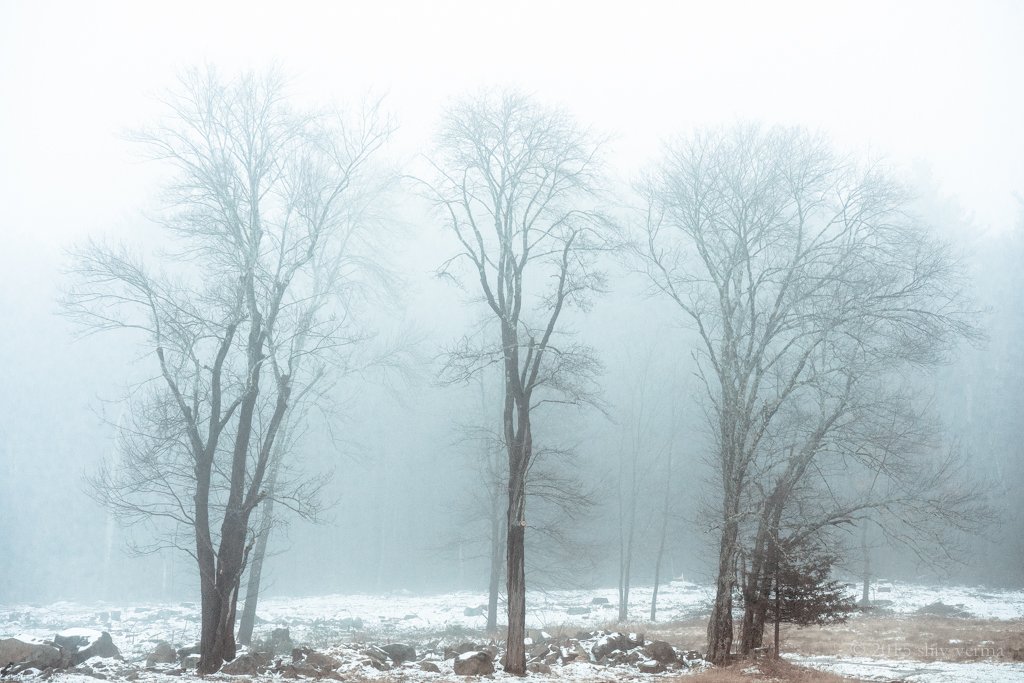 After the fog this weekend and some of the questions that have been asked, I have written an article on Fog Photography that you may find useful. The article is posted in the "Tips" section of my web. Click Here for the article.
Fog - In the Dark
In continuation of yesterday's post, the second image I had pre-visualized was a barn nestled among some dark trees with a figure in some vintage clothing standing in the foreground. I wanted to light the figure for some added effect. Driving in a nearby town I notice this barn or shack, so my wife and I decided to check it out. It was close to what I was wanting to capture. My wife put on this vintage coat and trudged through the slush to the shack. I in the mean while took a few test shots to check out the light and composition. I had not worn proper boots and was wearing a pair of slip ons. In the rush to get out and shoot, as luck would have it, as I carried the light stand and soft box to the shack I realized I was ankle-deep in slush and freezing water. Next my pocket wizards decided they would limit their range so I had to get closer than I wanted as all I had taken with me was the 35 - 100 mm on my GH4. To get the full shot I would have to take two images and stitch them. The final image is composed of two images stitched in Photoshop and then textured.Please click on the image for a larger rendition.
5:00 PM – Panasonic Lumix Gh5, 35 – 100 mm f/2.8 at 35mm. Exposure triad – ISO 200, f/2.8, 1/6 sec.
Fog - January 4, 2015
Today was the first day in 2015 that I picked up a camera and stepped out to see if I could get two images that I have been envisioning. The first was a tall lone tree in fog or mist the other I leave for tomorrow. I wanted it to be a monochrome image, B&W or cyanotype - I settled on B&W. The snow against the dirt and rocks adds to the scene creating a strong foundation for the rest that is mainly an ethereal sky.
Photography Post-processing - Which Tablet would you recommend?
 This post is in response to a question I was asked yesterday.In my opinion and having used a tablet for the past 12 years or more I would say that if you draw or retouch using your computer you need a tablet and a pen. Not only is the pen more ergonomic but it is far more natural in the way you position your hand and fingers compared to the award two or three button mouse.The mouse is fine for basic painting and clocking. Anything more and it just does not cut the mustard.Though the tablet and pen is not an essential tool for photographers it becomes essential if you do any retouching, masking and digital art.So the question about which tablet should a photographer get can be answered in a few ways. Undoubtedly the Wacom is the finest tablet in the market. There are others but I would stay away. You want a tablet that is well designed and works.For any peripheral device one of the key considerations is the software interface and the drivers. Here Wacom excels.
 The size of the tablet you used should be based on whether you are a single or dual monitor user. For single monitor users, my suggestion is the small or medium Wacom tablets. For dual monitor users the choice is the large or the extra-large. The reason for the large are larger tablet is because you can map each monitor to two halves of the tablet.Wacom makes three tablet products. The Bamboo, The Intuos Pen and the Intuos Pro. As a photographer I would stay away from the Bamboo as I feel it is a touch pad and with the stylus great for doodling.So the choices are the Intuos Pen or the Intuos Pro. Both can be connected via USB or wireless. The Intuos has touch sensitivity in all models while the Intuos Pen has an optional touch version.Lets compare the two.
| Intuos Pen | Intuos Pro | |
| Interface | USB | USB |
| Tablet Dimensions | 10.75 x 8.75 x 0.4 in | 15 x 9.9 x 0.5 in |
| Active Area | 8.5" x 5.3" | 8.8" x 5.5" |
| Pressure Levels | 1024 tip | 2048 on tip and eraser |
| Resolution | 2540 lpi | 5080 lpi |
| Express Keys | 4 customizable | 8 customizable |
| Mutli-Touch: Yes | Yes | Yes 10 Fingers |
| Multi-function Touch Ring: no | No | Touch Ring: Yes - 4 customizable functions |
| Radial Menu | No | Yes |
| Pen | Nib and Eraser | Grip: Latex-free silicone rubber |
| Pen Nibs | 5 Standard | Replacement Nibs: 10 nibs : 5 standard, 1 flex, 1 stroke nib, and 3 felt |
| Pen Tilt | No | Yes +/- 60 levels |
| Pen Switches | No | 2 customizable |
Wacom Intuos Pro is highly customizable. It has 8 buttons and a multi-functional touch ring and two buttons on the pen. The Intuos Pen has 4 customizable buttons in the top panel. With the Intuos Pro each of them can be assigned a different custom feature - from scrolling, panning and zooming to keyboard shortcuts and changing brush size. You can also use the tilt feature to change brush shapes. A Shortcut Menu can be assigned to one of the buttons and when clicked a circular menu will show on the screen. This menu system gives access to several additional shortcuts than can be layered. Another great feature is the ability to set and customize buttons by application. So Photoshop can have its own custom buttons and Lightroom its own, etc.Pressure sensitivity is always questioned. If you use Photoshop that recognizes pressure sensitivity then the choice is the Intros Pro with higher levels. You will notice the difference only when comparing the two tablets side by side. If all you use is Lightroom then you do not need the greater pressure sensitivity and the Intros will serve you well.Intuos Pro also supports hand gestures that are customizable too. You can pan, zoom and rotate using gestures. This feature can be enabled or disabled as needed.In my opinion the Intuos Pen is ideal for beginners. This is a very good tablet for drawing, painting and photo editing. The Intros Pro on the other hand is one of the best in tablets. The difference in price is fully justifiable. This is a tablet for photographers who do a lot of post-processing, image retouching and work extensively with layer masks. Precision cloning, masking, dodging and burning, is controlled yet simplified. Of importance is the fact that you are unlikely to outgrow the features this tablet provides.Wacom also make the Cintiq family of high definition pen monitors that are exceptional.